What you need to know about filing a tax extension.
An extension is an extension of time to file, not to pay your tax due.
If you are going to owe tax, then the payment needs to be made on or before April 15th to avoid penalties and interest.
If you need to file an extension for your tax return, the process is relatively easy using the IRS online payment system or paper form. A federal extension also automatically extends your state returns as well (in most states).
There are a variety of reasons to file an extension, with the most common reason being that you need more time to gather the documents needed for your tax return.
An extension also allows you more time to work with your tax preparer to review the return to make sure everything is accurate.
Below are the step-by-step instructions on how to file your extension and pay tax due on or before April 15th.
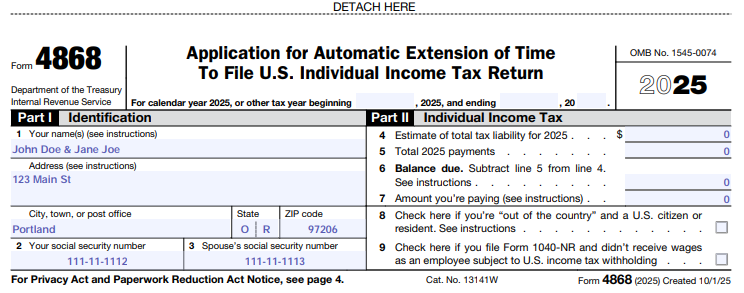
File Form 4868 electronically without a payment.
Fill out Form 4868 here: https://www.irs.gov/pub/irs-pdf/f4868.pdf
Make sure to enter your name (and spouse’s name) and address for your current residence.
Enter your SSN in box 2 and your spouse’s SSN in box 3.
If you are unsure who is the taxpayer and who is the spouse - look at your prior year tax return, Form 1040, page 1 for that information.
This is important since all IRS payments and records will be in the taxpayer’s SSN as the primary filer.
Enter all zeros for the tax liability boxes.
Print and mail the form to the address instructed on page 4 of the instructions. The address varies depending on what state you reside in.
Mail the form certified via USPS with tracking. No return receipt/signature is needed. This is proof that you filed your form on time and can track that it arrived at the IRS center.
No need to file anything with the state.
File Form 4868 electronically with a payment.
Pay what you owe using an online payment option and check the box that you are paying as part of filing for an extension. You don’t have to file a separate extension form and you’ll receive a confirmation number of your extension for your records.
Federal tax payments - https://www.irs.gov/payments
Click on your desired payment method (bank ACH or credit card).
Click on pay individual income tax.
Click on make a payment (blue button)
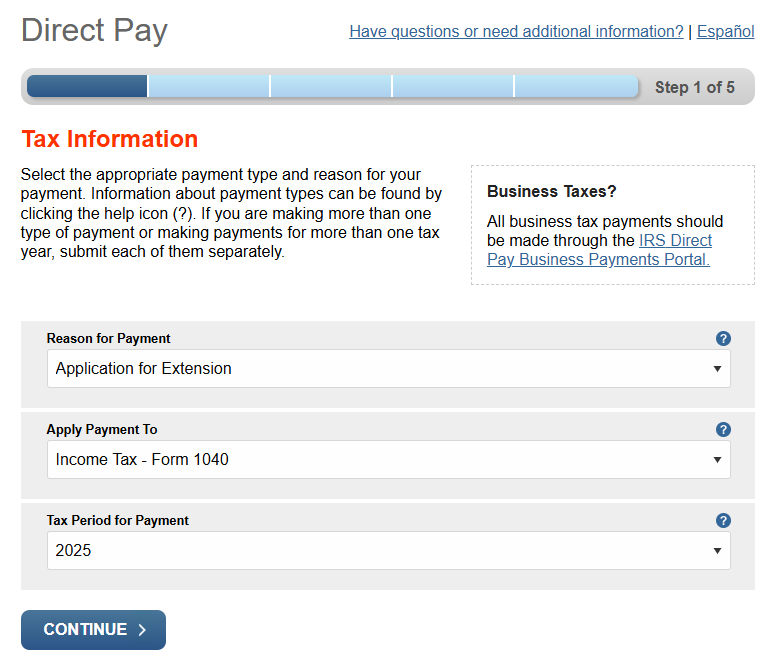
Reason for payment is Application for Extension, apply payment to Income Tax - Form 1040, and tax period payment is year 2025.
Enter your personal information from your 2024 tax return to verify your identity.
Enter your payment amount and payment method detail.
Make sure to enter your email to receive an emailed confirmation.
Print the confirmation for your records (as a back up to the emailed confirmation).
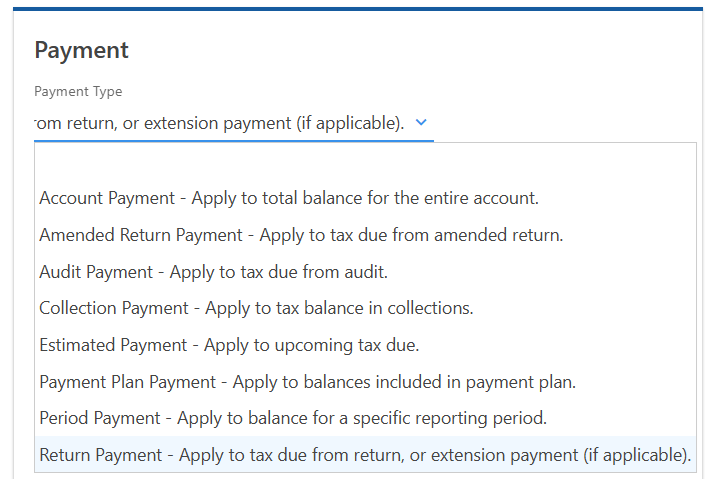
You’ll need to make an extension payment with your state and possibly city/local agencies as well (if applicable). Some states don’t have a specifc extension payment option. I’ve included what Oregon’s Revenue Online extension payment option looks like for reference. Make sure you mark all extension payment for year 2025.
How do I know what to pay?
This can be a bit tricky, I know. It’s part math and part guessing until the actual return is prepared. You need to do this for any state tax due as well!
So here is what I recommend:
If your income is the same as the prior tax year (or close to it) - take the total amount of tax you owed in the prior year (Form 1040, page 2, line 24) and subtract the amount of withholding and estimated taxes paid from the total. If you didn’t get zero or a negative number, then you’ll need to make a payment with your extension.
If your income is different than the prior year -
Take the amount of income you have (wages, interest, business income, etc) and multiply it by the effective tax rate from your prior year return. This rate can be found on your tax summary provided by your tax preparer or tax software. This should get you at tentative tax due amount. The amount may or may not be higher than the actual tax due with your return, but it’s a close guess.
Subtract the amount of withholding and estimated taxes paid from the total. If you didn’t get zero or a negative number, then you’ll need to make a payment with your extension.
If you happen to pay too much with your extension, the overpayment can be applied as an estimated payment or refunded to you.
If you happen to pay too little, then you’ll still owe with your tax return filing and be subject to possible penalties and interest.